Payments on Parimatch: Deposit & Withdraw in Seconds
| Method | Deposit Min | Deposit Max | Withdrawal Min | Withdrawal Max | Notes |
| UPI | ₹500 | ₹80,000 | NA | NA | Safe and free, easy to use |
| PhonePe | ₹200 | ₹50,000 | NA | NA | Secure via UPI PIN, fast |
| Paytm | ₹300 | ₹50,000 | NA | NA | Works with wallet, UPI, and bank |
| Crypto (Binance) | ₹200 | ₹5,00,000 | NA | NA | Fast, no bank needed, safe |
| Bank Transfer | NA | NA | ₹500 | ₹7,500 | Instant cashout, works with most banks |
Parimatch Deposit Methods—Simple & Secure
To play games on Parimatch or place live sports betting bets on cricket, football, & 40+ sports, you must top up your betting account first. The good news is that, on our platform, adding funds is super easy. In fact, we have devised our deposit infrastructure in such a way that the process is simple and secure for every Indian gamer.
As a user, you can choose to deposit money into your gaming account in various ways. The payment methods supported cover the modes that are mainly popular in India. These include UPI, PhonePe, & Paytm.
In addition, you can add money using your crypto wallet. Each payment method has different advantages. And each payment method is meant for a different kind of user. You are free to choose your own payment method for deposits.
But before you make your first deposit, there’s something important you should know. Every payment method has a minimum deposit limit. In simple words, this means that when you choose a payment option, you must add at least the minimum required amount. If you try to deposit less than that, your payment won’t go through. The minimum limit is different for each payment method.
| Deposit Method | Minimum Deposit | Maximum Deposit | Time to Credit |
| UPI | ₹500 | ₹80,000 | Usually within 5 minutes; max 1 business day |
| PhonePe | ₹200 | ₹50,000 | Usually 30 seconds; max 1 business day |
| Paytm | ₹300 | ₹50,000 | Usually 10–30 seconds; max 1 business day |
| Crypto (Binance) | ₹200 | ₹5,00,000 | Usually 2–3 seconds; max 2 minutes; up to 1 business day in rare cases |
UPI Parimatch Deposits
Benefits of Deposits Via UPI
✔ When you add money via UPI, the funds get credited within seconds. This means you won’t need to wait for hours before placing bets.
✔ The UPI payment method is very simple to use. You don’t need much technical knowledge for this.
✔ UPI payments in Parimatch cover various popular Indian payment apps. These are Google Pay, PhonePe, and Paytm. You can use any of them to deposit money.
✔ Payments via UPI are free of extra charges. Or, in other words, you don’t have to pay any fee for payment.
✔ UPI payments are safe. All payments are processed only after you enter the PIN.
✔ Payments via UPI are available 24/7. You can choose this method & make deposits anytime, anywhere.
How to Deposit Money Via UPI
To deposit money to your Parimatch gaming account by using UPI, follow these steps:
- Visit the official Parimatch website or launch the app.
- Click on the Log In button. Enter your email ID/phone number/account number. Enter the password and tap on Log In again.
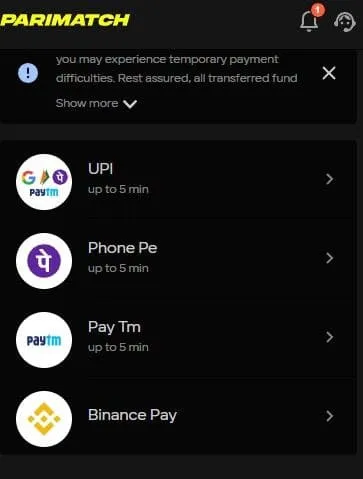
- Hover over to the top right corner of the screen. Tap on the “Deposit+” button. Alternatively, tap on the profile icon. Then, under the Balance tab, tap on the “Deposit+” button.
- A list of options will pop up. Choose UPI.
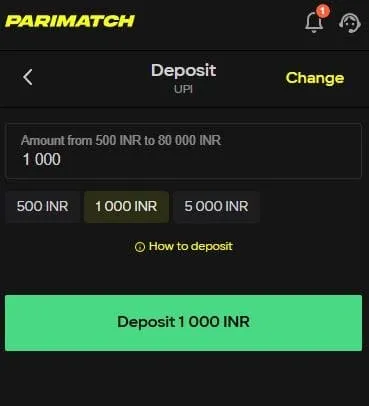
- Enter the amount.
- Tap on the green Deposit button.
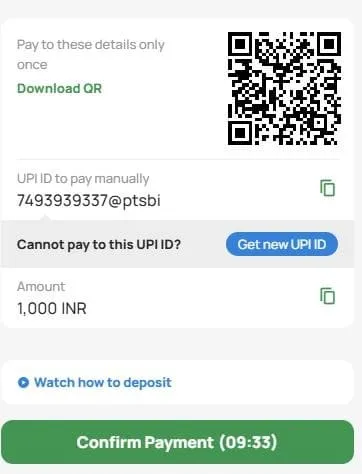
- A QR will be generated. Open any UPI app and scan the QR.
- Enter your PIN and confirm the deposit.
Minimum and Maximum Deposit Limit: UPI
The Parimatch minimum deposit amount for payments via UPI is ₹500. You must add at least ₹500, or the payment won’t be processed. On the other hand, the maximum amount that you can add via UPI is ₹80,000. If you want to add more, you must repeat the process.
Time Taken for UPI Payments
Payments via UPI are quick. In general, when you choose to deposit money via UPI, the funds will get credited to your gaming account within 5 minutes (maximum). However, sometimes due to server issues or bank delays, the payment may take up to 1 business day. If your payment is still pending after that, we recommend contacting our customer support team for help.
PhonePe Parimatch Deposits
Benefits of Deposits Via PhonePe
✔ When you add money via PhonePe, the funds are credited within seconds. You don’t have to wait long to start playing or betting.
✔ The PhonePe payment method is very simple to use. Anyone can do it with just a few taps on their phone.
✔ PhonePe is a trusted Indian payment app. It is linked directly to your bank account. You can use it easily for quick Parimatch deposits.
✔ Deposits via PhonePe are free of extra charges. You get the full amount added to your Parimatch account.
✔ PhonePe payments are safe and secure. Every transaction needs your UPI PIN. This means your money is always protected.
✔ Payments via PhonePe are available 24/7. You can deposit anytime, even on weekends or holidays.
How to Deposit Money Via Phone Pe
Another way to deposit money to your Parimatch gaming account is by using PhonePe. To do so, follow these steps:
- Visit the official Parimatch website or launch the app.
- Click on the Log In button. Enter your email ID/phone number/account number. Enter the password and tap on Log In again.
- Hover over to the top right corner of the screen. Tap on the “Deposit+” button. Alternatively, tap on the profile icon. Then, under the Balance tab, tap on the “Deposit+” button.
- A list of options will pop up. Choose PhonePe.
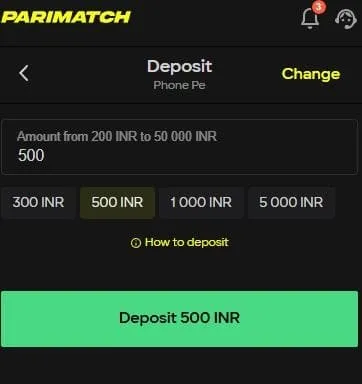
- Enter the amount you want to add.
- Tap on the green Deposit button.
- In seconds, a PhonePe QR will be generated. Save the QR code. You can just take a screenshot of it and continue.
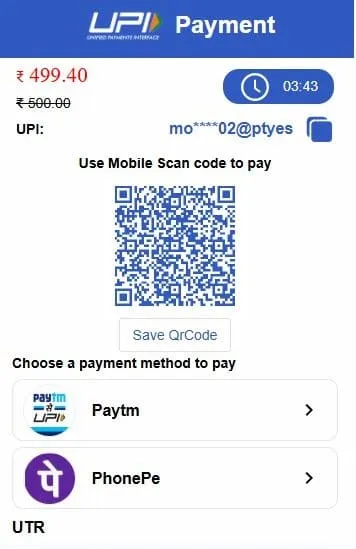
- Open the app and scan the QR.
- Enter your PIN and confirm the deposit.
Minimum and Maximum Deposit Limit: PhonePe
The Parimatch minimum deposit amount for payments via PhonePe UPI is ₹200. You must add at least ₹200. If you try to deposit anything less, the payment won’t be completed. The maximum amount that you can add via PhonePe is ₹50,000. If you want to add more, you must repeat the process.
Time Taken for PhonePe Payments
Deposits via PhonePe are also very quick. When you deposit money using this method, the funds will be credited to your gaming account in 30 seconds. The maximum time that it might take is 5 minutes.
However, sometimes due to server issues or bank delays, the payment may take up to 1 business day. If your payment is still pending after that, we recommend contacting our customer support team for help.
Paytm Parimatch Deposits
Benefits of Deposits Via Paytm
✔ Deposits via Paytm are very quick.
✔ Paytm is very easy to use. You can make deposits in just a few simple steps using your phone.
Paytm works with almost all major Indian banks, so you can easily deposit from your own account.
✔ Paytm is a trusted Indian payment app. The transactions are 100% secure.
You can deposit through Paytm Wallet, UPI, or directly from your bank.
✔ Deposits made through Paytm are free. There are no extra charges.
✔ Paytm works 24/7. You can make deposits anytime, even during late hours or holidays.
How to Deposit Money Via Paytm
Are you a Paytm user? Well then, you can deposit money into your Parimatch gaming account by using Paytm. Here is the complete step-by-step guide:
- Open a web browser and visit the official Parimatch website. Or, you can launch the app on your mobile.
- Click on the Log In button. Enter your email ID/phone number/account number. Next, enter the password and tap on Log In again.
- Go to the top right corner of the screen. Tap on the “Deposit+” button. Alternatively, tap on the profile icon. Then, under the Balance tab, tap on the “Deposit+” button.
- A list of options will pop up. Choose Paytm.
- Enter the amount you want to add.
- Tap on the green Deposit button.
- A Paytm QR will be generated. Save the QR code by taking a screenshot.
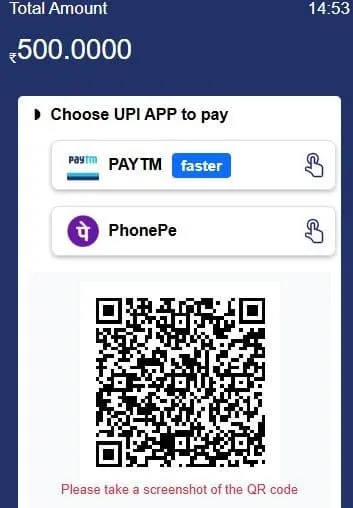
- Open the Paytm app and scan the QR.
- Enter your PIN and confirm the deposit.
Minimum and Maximum Deposit Limit: Paytm
The minimum deposit in Parimatch that you must make while using Paytm is ₹300. You must add at least ₹300. If you try to deposit anything less, the payment won’t go through. The maximum amount that you can add via Paytm is ₹50,000. If you want to add more, you must repeat the process.
Time Taken for Paytm Payments
When you deposit money using Paytm, the money will get credited to your gaming account in 10 to 30 seconds. The maximum time that the payment might take is 5 minutes.
However, sometimes due to server issues or bank delays, the payment may take up to 1 business day. If your payment is still pending after that, we recommend contacting our customer support team for help.
Crypto (Binance) Parimatch Deposits
Benefits of Deposits Via Binance
✔ Deposits via Binance are very fast. The money is usually credited to your account within seconds.
✔ You can deposit up to ₹5,00,000 in a single transaction. This is higher than all the other methods available on Parimatch.
✔ The process is safe and secure. Binance is a reliable platform. It uses strong protections for your money and personal information.
✔ Using Binance is simple if you already have a crypto account.
✔ Crypto deposits are available 24/7. So, you can add funds anytime. Yes, even on holidays or late at night.
✔ Binance payments are convenient. This is because you don’t need a bank account or card to deposit.
✔ Payment via this method is free from extra charges. The full amount you deposit will be added to your Parimatch account.
How to Deposit Money Via Binance
On Parimatch, you can make deposits via crypto tokens. For that, however, you must use the Binance cryptocurrency exchange platform. If you already have an account, you are ready to use it. Here is how
- Open a web browser and visit the official Parimatch website. Or, you can launch the app on your mobile.
- Click on the Log In button. Enter your email ID/phone number/account number. Next, enter the password and tap on Log In again.
- Go to the top right corner of the screen. Tap on the “Deposit+” button. Alternatively, tap on the profile icon. Then, under the Balance tab, tap on the “Deposit+” button.
- A list of options will pop up. Choose Binance.
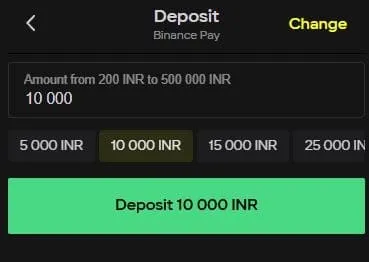
- Enter the amount you want to add.
- Tap on the green Deposit button.
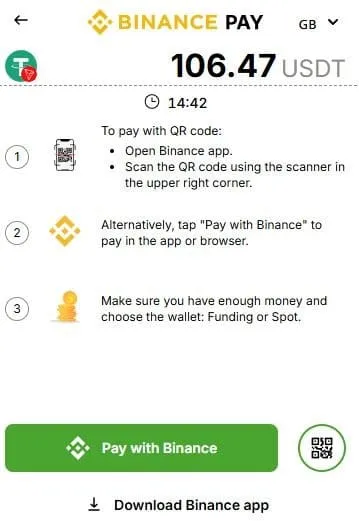
- You will be redirected to an external page. There, you can check the converted amount into USDT. Tap on the “Pay with Binance” button and process the payment.
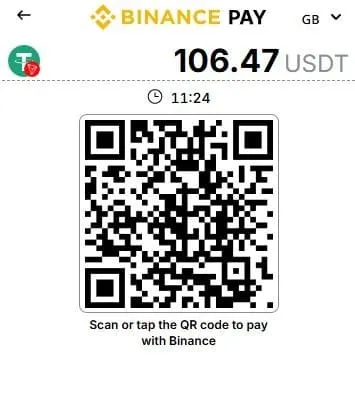
- Alternatively, you can save the QR. Open the Binance app. Tap on the scanner button on the top right corner. Scan the QR and make the payment.
Note: To use Binance, you must have an account in the first place. Second, you must have USDT tokens to process the payment.
Minimum and Maximum Deposit Limit: Binance
Just like other payment methods, there is a limit for crypto payments as well. The minimum deposit in Parimatch while using Binance is ₹200. This means you must deposit at least ₹200. Try any amount less than that and your payment won’t be successful.
Among all the payment methods in Parimatch, the maximum limit is the highest for Bioanance. If you choose this mode, you can deposit up to ₹5,00,000 in a single transaction.
Time Taken for Crypto Payments
Crypto payments are one of the quickest ways to deposit money on Parimatch. If your exchange platform has the funds ready, the payment can be processed in just a few taps.
When you deposit money using Binance, the funds usually get credited to your gaming account within 2 to 3 seconds. In rare cases, due to network or server issues, the payment might take up to 2 minutes.
However, sometimes delays can occur because of blockchain confirmations or technical issues, and the payment may take up to 1 business day. Is your deposit still pending after that? Please contact our customer support for assistance.
Cool Bonuses for First-Time Depositors
Boost your first deposit with these amazing welcome bonuses. Pick the one that suits your favourite games and get extra money to play or bet!
| Offer | Bonus % | Min Deposit | Max Reward |
| Instant Games Welcome Bonus | 100% | ₹350 | ₹30,000 |
| Live Casino Welcome Bonus | 100% | ₹100 | ₹50,000 |
| Sports Welcome Bonus | 150% | ₹100 | ₹20,000 |
| Slots Welcome Bonus | 150% | ₹100 | ₹105,000 |
How it works:
- Pick your favourite type of bonus.
- Make your first deposit with the minimum amount required or more.
- Get your bonus instantly and start playing or betting.
Why you’ll love it:
- More money to play your favourite games.
- Works on instant games, live casino, sports, and slots.
- Simple and easy to claim.
Parimatch Withdraw Quick and Simple
Just like adding money to your account, cashing out your winnings is also simple on Parimatch. As of now, you can use bank transfers to withdraw your money instantly. In the near future, you will be able to use UPi and other payment methods as well.
Benefits of Parimatch Withdrawal via Bank Transfers
✔ Most bank transfers at Parimatch are processed instantly or within a few minutes. This means that once you request a withdrawal, your money is usually in your account very quickly, so you don’t have to wait long to enjoy your winnings.
✔ In the bank transfer process, all you need to do is provide your bank account details. There are no complicated steps. You will not need to download any extra app. The money will get credited directly to your account safely.
✔ Whether you have an account with SBI, HDFC, ICICI, or any other popular bank, the transfer process is smooth and reliable. You don’t have to worry about compatibility or delays.
✔ Bank transfers are one of the safest ways to receive your money. The funds are sent directly to your account without any middlemen, keeping your money secure at all times.
✔ Parimatch Withdrawals using bank transfer are free from any additional charges.
✔ You can make a withdrawal request at any time. This includes weekends and holidays. You are not restricted by banking hours.
✔ Every bank transfer can be checked and tracked through your own bank account. You can see exactly when the money got credited to your account.
How To Withdraw Money on Parimatch
If you want to withdraw your winnings from Parimatch, just follow these steps:
- Visit the official website of Parimatch or launch the mobile app.
- If you have logged out of your account, log back in. To do so, tap on the Log In button. Then, enter your email ID, phone number, or account number. Next, enter your password and tap the Log In button.
- Look for the profile icon and click on it.
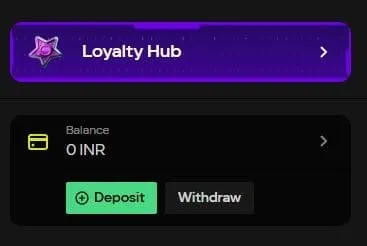
- Scroll down and under the Balance tab, tap the Withdraw button. You will then be redirected to a new page.
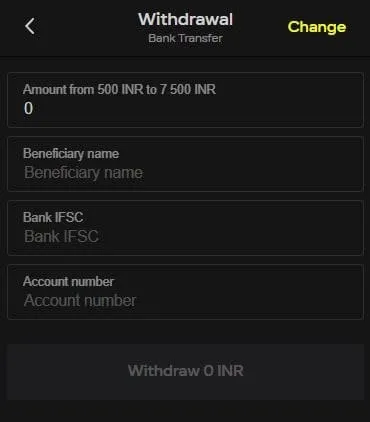
- Enter the amount of money you want to withdraw.
- After that, enter the Beneficiary’s name.
- You must also enter the Bank IFSC code and the account number on which you want to transfer the money.
- Finally, tap on the Withdraw button and wait to receive the payment.
Minimum and Maximum Limits for Withdrawals
At Parimatch, there are set limits for withdrawals as well. The minimum withdrawal amount is ₹500. This means you cannot request less than this. And the maximum amount per withdrawal is ₹7,500. If you try to withdraw less than ₹500, the request will not go through. Also, if you try to withdraw more than ₹7,500 in a single transaction, it will also be rejected.
To withdraw amounts higher than the maximum limit, do this: Split the withdrawal into multiple transactions.
Parimatch Withdrawal Time in India
The Parimatch withdrawal time in India is almost instant. In fact, this is one of the main reasons why gamers and bettors love our platform. When you request a withdrawal, bank transfers are processed quickly, and in most cases, you are likely to receive your money within 5 minutes.
Although withdrawals are usually instant, there can sometimes be delays. Some common reasons include:
- Occasionally, the bank may take extra time to process the transaction.
- Internet or platform problems can slow down the withdrawal.
- If your account is not fully verified, withdrawals may be temporarily blocked.
- Any mismatch in bank details can cause delays.
If you experience a delay, here are some simple steps you can take:
- First, double-check if your account is fully verified.
- Second, check that the account number and IFSC code are correct.
- Third, wait for the bank servers to get fixed. Once they are up and running, you will receive your funds.
- Fourth, try to contact your bank for more help.
If you have tried the above steps and your withdrawal is still pending, don’t worry. Our Parimatch support team is always ready to help you.
- Log in to your account.
- Tap on the three-line main menu icon.
- Scroll down. Click on the support option. This will open the live chat feature.
- Share your query. You can also visit our help centre and read articles related to the Parimatch withdrawal process.
Crucial Requirement for Parimatch Cash Out: “Account Verification”
There are times when users fail to initiate the Parimatch cash out process. That is probably because on our site, a user must verify their identity before withdrawing any money.
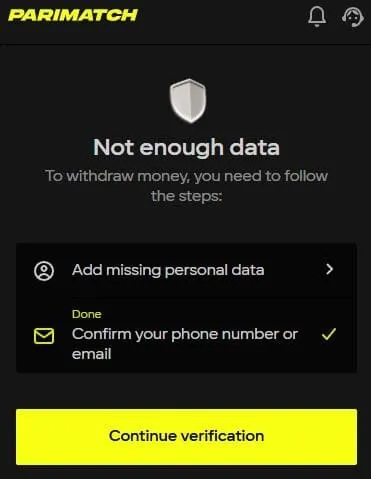
Parimatch account verification is an important feature. It helps keep the site safe from scammers. There are many people who try to cheat by using fake accounts or stolen information. So, we don’t just allow anyone and everyone to create an account and join the community.
If we did, anyone could create an account and withdraw money without verification. This could eventually cause big problems for the gaming system. Scammers could disturb the platform and even affect other users’ accounts.
How to Verify Your Parimatch Account?
Parimatch verification works in a two-tier system. In the first tier, you need to complete your profile by adding genuine information about yourself. This includes your full name and date of birth. You also must add valid contact details like your phone number and email address. We check all these to confirm that your account belongs to a real person.
Here is the complete process:
- Open your profile.
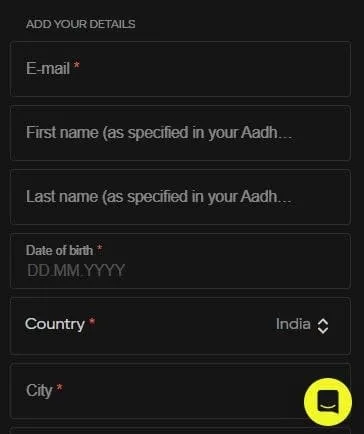
- If you have created your Parimatch account with your phone number, add a valid email address. If you have used an email address for account creation, add a valid phone number.
- Enter your first name.
- Then, enter your last name. Both must be as specified in your Aadhar Card.
- Next, enter your Date of Birth.
- After that, add your Country.
- Next, select your City.
- To complete your profile, choose a secret question. Then type in an answer and tap on the Save button.
Account Verification Process (Step by Step)
Step 1: Open the Parimatch App and Access Your Profile
- Launch the Parimatch app on your phone.
- Look at the bottom tab of the app screen.
- Tap on the profile icon, which is located immediately to the left of the three-line hamburger menu button.
Step 2: Start the Account Verification Process
- In your profile menu, find and click on “Account Verification.”
- You will be redirected to a new page specifically for verification. Wait for the page to fully load.
Step 3: Confirm Your Email
- In the Personal Data section, you will see an option to confirm your email. Tap on it.
- Open your email app and check your inbox. Look for a verification email from Parimatch.
- Open the email and click on the verification link.
- Once completed, re-launch the app or reload the site.
Step 4: Go to the Account Verification Section Again
- Open your profile once more and click on the “Account Verification” button.
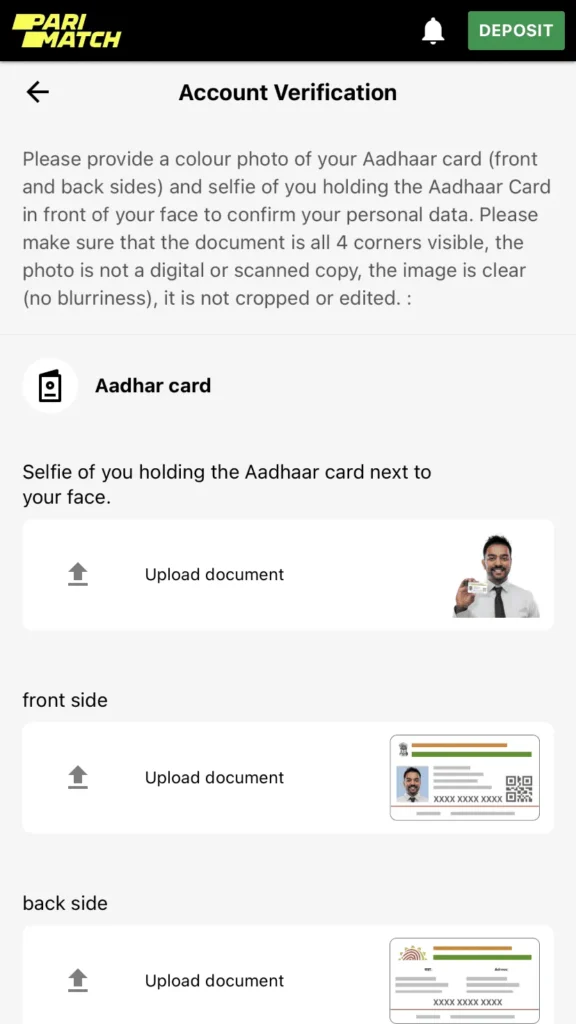
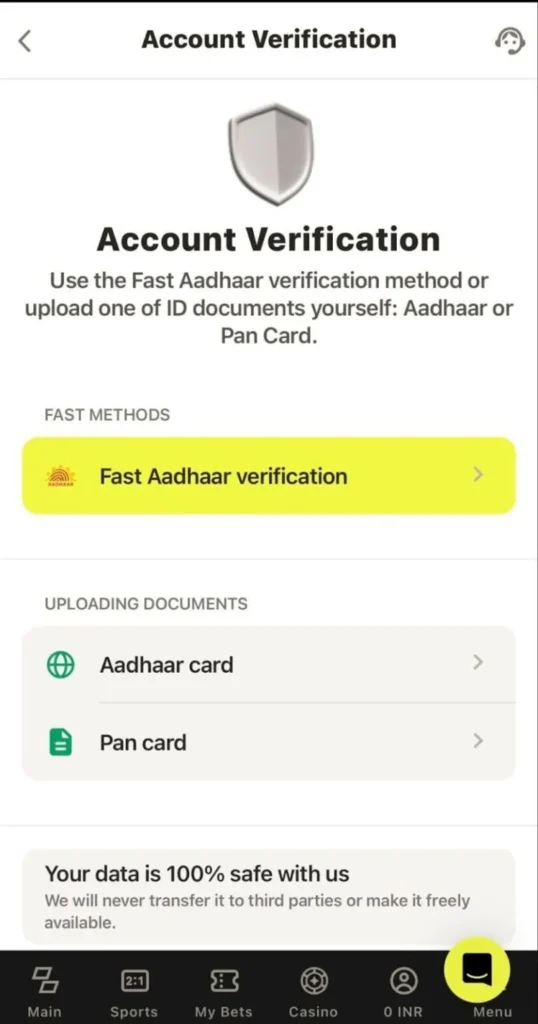
- Now, you will see two options to verify your account. You can either verify using your Aadhaar number directly or by uploading soft copies of your Aadhaar.
Step 5: Verifying Using Aadhaar Number (Manual Entry)
- Click on the Fast Aadhaar Verification button.
- Enter your 12-digit Aadhaar number carefully. Make sure every digit is correct.
- Double-check the number and click proceed.
- You will receive a one-time password (OTP) on your Aadhaar-registered mobile number. Enter the OTP in the app to authenticate your Aadhaar.
- After submitting the OTP, wait for our support team to review your information and verify your account.
Step 6: Verifying by Uploading Soft Copies of Documents
If you prefer, you can verify your account by uploading soft copies of your documents instead of entering the Aadhaar number manually.
- Click on the option to upload documents.
- Take clear photos of the front and back of your Aadhaar card or PAN card.
- Take a selfie holding the Aadhaar/PAN card next to your face. This helps confirm your identity.
- Upload all the images and wait for the verification team to process your request.
Important Guidelines for Document Uploads
- Use colour photos of your Aadhaar or PAN card. Black-and-white or scanned copies are not accepted.
- Ensure that both the front and back sides of the card are visible.
- Make sure the photo is clear. Do not upload blurry, cropped, or edited images.
- For the selfie, ensure that your face and the card are clearly visible together in the photo.
- All information on the documents must be readable without any obstruction.
Step 7: Wait for Verification
- Our support team reviews the information carefully.
- The review process ensures that all the information is genuine and accurate.
- After verification, your account will be fully active, and you can deposit and withdraw funds without any restrictions.
Tips for a Smooth Verification Process
- Keep your documents ready before starting.
- Use your official Aadhaar/PAN card only.
- Check the details carefully to avoid errors.
- Follow all instructions in the app and email.
- Do not crop, edit, or blur images. Clear photos speed up verification.
Common Issues and How to Fix Them
- OTP not received: Make sure your mobile number is linked to Aadhaar and has network coverage.
- Verification pending too long: Sometimes verification can take a few hours. If it exceeds 24 hours, contact Parimatch customer support.
- Documents rejected: Check that the photos are clear, in colour, and include all four corners of the card.
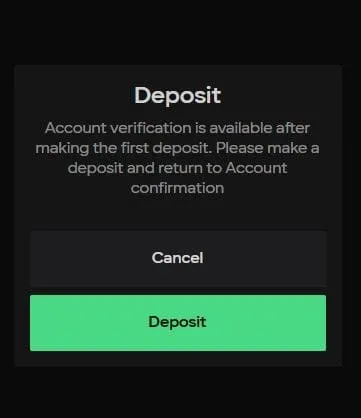
The option to verify your account becomes available after you have successfully made your first deposit. If you have not deposited any funds yet, you will see the following message when you click the Account Verification button.
Download the Parimatch App For Easy Payments
You can now download the official Parimatch app for free and make payments in just a few taps. After installing the app, you can deposit funds right from your mobile phone. If you use the same phone for UPI apps like Google Pay, adding money will be even simpler. Not just that, initiating a withdrawal is also easy when you use the app. So why wait? Follow the steps and download it today.
- Open any browser on your phone, like Chrome.
- Visit the official Parimatch website.
- Click the three-line menu icon.
- Scroll down and tap on “Mobile Apps.”