
Parimatch Deposit via UPI │ Bet on Games/Sports, Get Bonuses
Knock knock! Who’s there? Parimatch, “the best online betting and casino in India.” We are here for Indian players who want a simple and safe way to bet on sports and play casino games. On our site, you can deposit money using payment methods that people in India already use every day. The process is quick and easy. And the best part? All payments are in INR. So, you don’t have to worry about currency conversion charges or extra fees. Register today and enjoy all the benefits. Download our app for free and deposit with your fingertips.
Deposit Parimatch: Popular Methods & Time to Credit
To play your favourite games for real money and bet on cricket, football, and 60+ other sports, you must fund your account first. Doing so is very simple and safe on Parimatch. We support three of the most popular payment methods in India, i.e., UPI, PhonePe, & PayTM. You can choose any and deposit money into your Parimatch betting account in the blink of an eye.
| Method | Minimum Deposit | Maximum Deposit | Time To Credit |
| UPI | ₹300 | ₹80,000 | 1-5 Minutes |
| PhonePe | ₹300 | ₹50,000 | 1-5 Minutes |
| Paytm | ₹300 | ₹80,000 | 1-5 Minutes |
Deposits at Parimatch: Top Features
Quick: Most deposits are credited within 1–5 minutes. No long waiting time. You can start betting right away.
Easy to Use: Making deposits on Parimatch is simple. Just follow a few easy steps. Even if you are new, you can add money to your account easily.
Indian Payment Methods: We support payment methods that are popular and widely used by people in India.
No Hidden Charges: Deposits on Parimatch are free from extra charges and hidden fees. What you deposit is exactly what you get in your account.
Transactions in INR: All payments are processed in Indian Rupees.
Safe & Secure: The payment methods available on our site are 100% legal. And, they have a big user base in India. So all your payments will be safe and secure.
Compatible: You can deposit from your desktop, laptop, or mobile phone.
24/7 Availability: You can add money anytime. Our deposit portal remains open 24/7.
Parimatch Online Casino Deposit: Step by Step Guide
The online casino deposit process is very simple for the users of Parimatch. We have kept everything easy so that even a new gamer or a fresh punter can start off their betting journey without a hitch. To add money to your account, you can use your desktop or laptop. If you are a mobile gamer, don’t worry, adding money is simpler on your phone.
How to Deposit Money on Desktop/Laptop
Step 1: Open a web browser, such as Chrome or Firefox. Head over to the URL section. Type in the Parimatch URL and visit the website.
Step 2: Click on the Log In button. You can find it in the top right corner of the screen. Enter your account number/mobile number/email address. Enter your password. Click on the Log In button again. Do not have an account? Register for free. Just follow these steps:

- Click on the Sign Up button. It is located next to the Log In button.
- Choose your Sign Up method: Phone or Email. If you choose phone, enter a working phone number (+91XXXXXXXXXX). If you pick email, enter a valid email address.
- Enter a strong password for your account.
- Read the terms and confirm that you agree to them. Also, confirm that you are at least 18 years old.
- Click on the Sign Up button.
- You will receive an OTP via SMS or Email. Enter it to verify your contact details.
- Click on the Sign Up button again, and your account is ready.
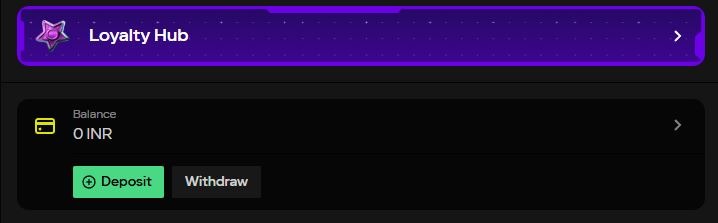
Step 3: Go to the top right corner of the screen. Click on the green colored “+Deposit” button. Alternatively, click on your profile icon. Move to the Balances tab. Click on the “+Deposit” button.
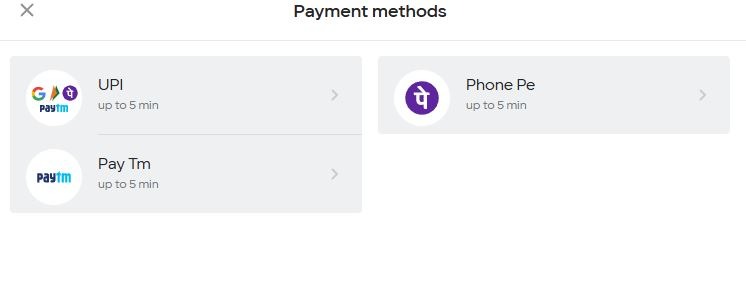
Step 4: A list of payment methods will appear. Choose the one you are comfortable with. Click on it.
Step 5: Enter the amount of money you want to deposit. Click on the Deposit button again.
How to Deposit Money on Mobile
Step 1: Open any web browser, such as Chrome, and go to the Parimatch website. You can also open the Parimatch mobile app on your smartphone.
Step 2: Tap the Log In button at the top right side of the screen. Enter your account number, mobile number, or email address. Type your password and tap Log In again. If you do not have an account, you can register for free by following these steps:
- Tap the Sign Up button next to the Log In option.

- Select your preferred Sign Up method: Phone or Email. If you choose phone, enter an active phone number (+91XXXXXXXXXX). If you choose email, enter a valid email ID.
- Create a strong password for your account.
- Read the terms and confirm that you agree to them. Also, confirm that you are 18 years or older.
- Tap the Sign Up button.
- You will receive an OTP via SMS or Email. Enter the OTP to verify your details.
- Tap the Sign Up button once again, and your account will be successfully created.

Step 3: After logging in, go to the top right corner. Find and tap the green “+Deposit” button. You can also tap your profile icon in the bottom menu. Next, open the Balances section and select the “+Deposit” option from there.
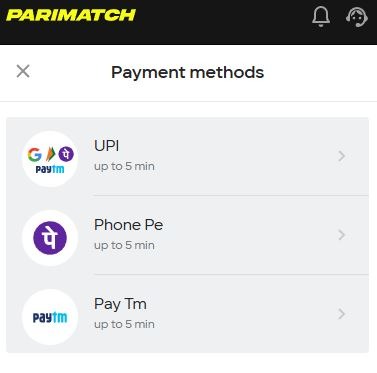
Step 4: A list of available payment options will be displayed. Choose the method you want. Then, tap on it.
Step 5: Enter the amount you wish to deposit and tap the Deposit button to complete the process.
Parimatch Deposit Via UPI
UPI stands for Unified Payments Interface. It is currently the most popular payment method in India. Almost everyone uses it for daily payments. With UPI, you can send and receive money directly from your bank account using your mobile phone. You do not need to enter long bank details. You just use a UPI ID or scan a QR code. The money transfers instantly. It works 24 hours a day, even on Sundays and holidays. On Parimatch, you can use UPI as an online casino deposit method.
UPI Deposits: Available Types
On Parimatch, we support all major UPI payment options. You can deposit using Google Pay. You can add money to your account via PhonePe UPI. Otherwise, you can use Paytm or BHIM UPI to make a deposit. Each UPI payment method on Parimatch is simple, safe, and quick. Plus, there are no hidden or extra fees.
UPI Deposits: Max/Min Limit & Time to Credit
| Method | Type | Minimum Deposit | Maximum Deposit | Time To Credit |
| UPI | Google Pay, PhonePe, Paytm, BHIM UPI | ₹300 | ₹80,000 | 1-5 Minutes |
UPI Deposits: Top Benefits
✔ Money is added to your account within seconds. You do not have to wait for hours or days.
✔ You can make a deposit anytime. It works on weekends and even on public holidays.
✔ You do not have to enter long account numbers or IFSC codes. Just use your UPI ID or scan a QR code.
✔ The process is very simple. Anyone who uses a smartphone can understand and use it easily.
✔ Every payment needs a UPI PIN. So, the UPI payment method is safe and protected.
✔ Deposits via UPI on Parimatch do not have any hidden charges. There are no extra fees.
✔ You can use different UPI apps like Google Pay, PhonePe, Paytm, or BHIM UPI.
✔ You get instant confirmation after the payment is successful. If not, the money will be credited to your bank account within 24 hours.
✔ Millions of people in India use UPI every day. You can trust and rely on this payment method.
How to Deposit via UPI: Step-by-Step Guide
Step 1: Tap the “+Deposit” button in the top right corner of the screen. Or, tap the profile icon, move to the Balances tab, and tap the “+Deposit” button.
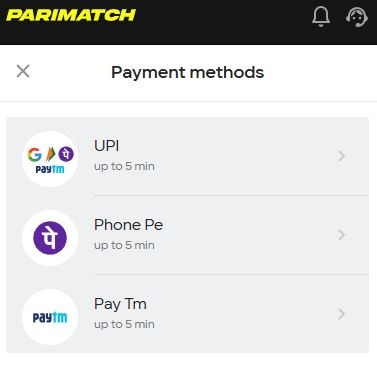
Step 2: Choose UPI from the list of payment options, then tap it.
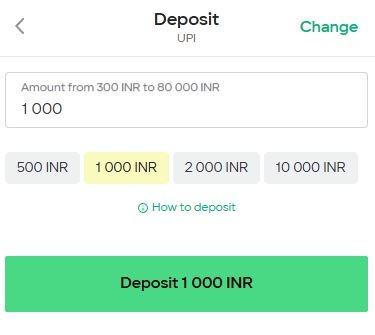
Step 3: Enter the amount you want to deposit. You can type it manually or use the preset values. After that, tap the Deposit button.
Step 4: You will be redirected to a new page. Wait for some time.
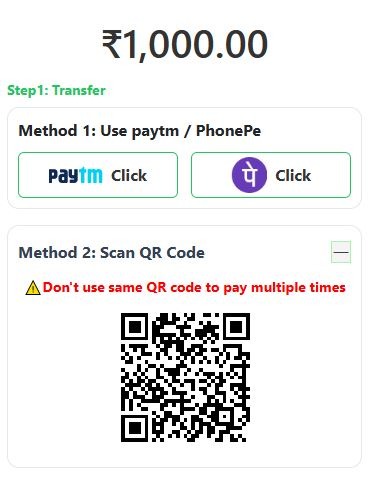
Step 5: You will see a QR code. Take a screenshot and save it on your phone.
Step 6: Open PhonePe, Paytm, BHIM, or Google Pay. Scan the QR code and complete the payment.
Step 7: After the payment is complete, copy the 12-digit UTR/Reference ID. Paste it on the payments page. Tap “Submit UTR” and wait.
After confirmation, money will be credited to your gaming account.
Parimatch Deposit Via PhonePe
PhonePe is one of the leading digital payment apps in India. It was founded in 2015. Today, it has more than 600 million users nationwide. With PhonePe, you can send and receive money directly from your bank account. You can use your UPI ID or scan the QR for this purpose. Just like the UPI, PhonePe works 24 hours a day. It is simple to use and 100% safe. On Parimatch, you can use PhonePe to make a deposit.
PhonePe Deposits: Available Types
QR code scanning. In this method, there is no need to enter any bank details. You don’t even need to enter the UPI ID manually. When you select PhonePe for payment, a QR code will be shown on your screen. You can simply open the PhonePe app and use the scan option to scan that code. The payment details are filled automatically. Then you enter the amount (if needed) and confirm the payment using your UPI PIN.
PhonePe Deposits: Max/Min Limit & Time to Credit
| Method | Type | Minimum Deposit | Maximum Deposit | Time To Credit |
| PhonePe | QR Code Scanning | ₹300 | ₹80,000 | 1-5 Minutes |
PhonePe Deposits: Top Benefits
✔ PhonePe payments are quick. It takes only a few seconds after you enter your UPI PIN.
✔ The process is very simple. It is an easy method for beginners.
✔ If you use this method, you do not need to enter details manually. This saves time and avoids mistakes.
✔ PhonePe works 24 hours a day.
✔ Payments via PhonePe are safe and secure.
✔ You get instant confirmation after the payment is done. You can clearly see the success message in the app.
✔ PhonePe deposits are free. No extra charges or hidden fees.
✔ The app is available for both Android and iOS.
✔ When you use PhonePe, you get instant payment confirmation on your screen.
How to Deposit via PhonePe: Step by Step Guide
Step 1: Tap the “+Deposit” button in the top right corner. You can also open your profile, go to the Balances section, and tap “+Deposit.”

Step 2: From the payment options, select PhonePe and continue.
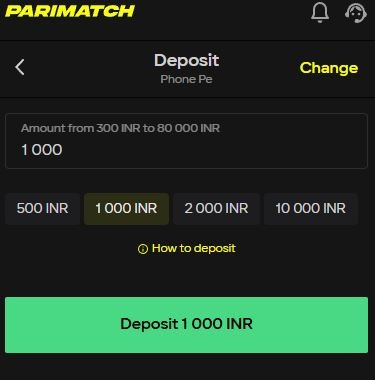
Step 3: Enter the amount you want to add. You can type the amount yourself or choose from the suggested values. Then tap the Deposit button.
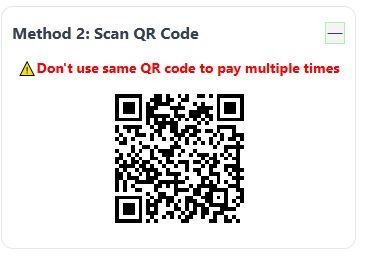
Step 4: A new page will open with a QR code. Wait until it fully loads on your screen.
Step 5: Now open the PhonePe app on your mobile phone. Tap on the Scan option. Next, scan the QR code shown on the deposit page.
Step 6: Check the payment details, enter your UPI PIN in the PhonePe app, and confirm the transaction.
Step 7: After the payment is successful, you will receive a 12-digit UTR (Reference ID) inside the PhonePe app. Copy this number. Go to the payments page. Paste the UTR. Tap “Submit UTR” and wait for confirmation.
Our technical team will verify the details. Once done, the deposit amount will be credited to your gaming account.
Parimatch Deposit Via PayTM
Paytm is another popular digital payments platform in India. It is used by millions of people for daily transactions like bill payments, mobile recharges, ticket bookings, and UPI transfers. And guess what? You can also use it to add money to your Parimatch gaming/betting account. Similar to other payment methods, using Paytm is simple. The process is fast and free from hidden charges. It works with all major Indian banks. If you have a Paytm account, you can start the Parimatch deposit process right away.
PayTM Deposits: Available Types
QR code scanning. When you choose Paytm as your payment option, a QR code will appear on your screen. You can just open the Paytm app and tap on the Scan option. Scan the QR code shown on the deposit page. Enter your UPI PIN and confirm the payment. The money will be transferred instantly from your bank account. This is the simplest way to pay using Paytm.
PayTM Deposits: Max/Min Limit & Time to Credit
| Method | Type | Minimum Deposit | Maximum Deposit | Time To Credit |
| Paytm | QR Code Scanning | ₹300 | ₹80,000 | 1-5 Minutes |
PayTM Deposits: Top Benefits
✔ Deposits are processed quickly. After confirmation, the money is sent in real time.
✔ The steps are easy to follow. You only need your Paytm app and UPI PIN to complete the payment.
✔ No need to share sensitive bank details on the deposit page. The QR system handles it automatically.
✔ The service works round the clock. You can deposit funds at any time, with no restrictions.
✔ Transactions are protected with your secure UPI PIN. So, the payment is safe.
✔ Paytm UPI deposits are free. They do not include extra charges.
✔ You receive a transaction ID after payment. This way, you can easily track your deposit if needed.
✔ Paytm supports multiple Indian languages. It is also available for both Android and iOS phones/tablets.
How to Deposit via PayTM: Step by Step Guide
Step 1: Go to your account and tap on the “+Deposit” option.
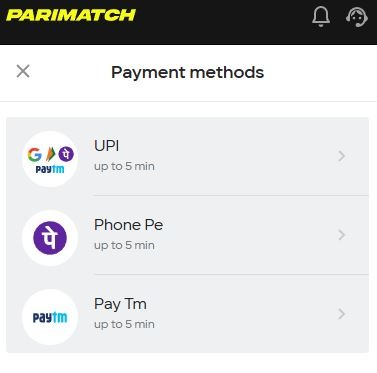
Step 2: From the available payment methods, choose Paytm.
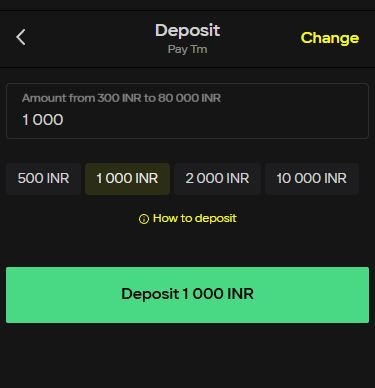
Step 3: Enter the amount you wish to add. It must be between ₹300 and ₹80,00 (both values included)
Step 4: A QR code will appear on the screen.
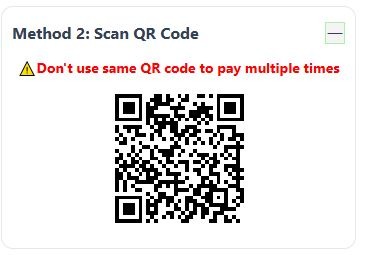
Step 5: Open the Paytm app on your phone and use the Scan feature to scan the QR code.
Step 6: Verify the details shown in the app, then enter your UPI PIN to confirm the payment.
Using the same phone for payment? Take a screenshot of the QR. Open the Paytm app. Load the QR from your gallery. Scan it and continue.
Step 7: Once the payment is successful, copy the transaction reference number/UTR. Head back to the deposit page. Enter the UTR for verification.
After approval, you can see the amount in your gaming balance.
Parimatch Deposit Bonus
Deposits on Parimatch are highly rewarding. If you are a new user, you can get exciting bonuses when you add money to your account for the first time.
Casino Slots Deposit Bonus
If you activate the Parimatch Slots Welcome Bonus, you can get a 150% bonus on your first deposit. The minimum amount you need to deposit is ₹100. The maximum bonus you can receive is ₹1,05,000.
| Parimatch Casino Slots Deposit Bonus: Terms & Requirements | |
| Who can get it? | Only new users of Parimatch can claim this bonus. Existing users cannot use it. |
| When is it activated? | The bonus is added after you make your first deposit. |
| Minimum deposit | You must deposit at least ₹100. If you deposit less than ₹100, you will not get the bonus. |
| Bonus percentage | You get 150% extra on your first deposit. |
| Maximum bonus | The highest bonus you can receive is ₹1,05,000. |
| Time to claim | You must make your first deposit within 1 day after activating the offer. Otherwise, it will expire. |
| If two deposit offers are active | Your first deposit will go to the offer that was activated first. |
| Wagering requirement | You must play (wager) the bonus amount 35 times within 3 days before withdrawing. |
| Where to wager | Bonus wagering is allowed only in the “Slots” section. |
| Game contribution | Different slot games count differently towards wagering. You can check details in the “Games to Play” page. |
| Maximum withdrawal | You can withdraw up to 5 times the bonus amount. |
| Where to check games | You can see eligible games in the “Games for Wagering” section. |
| Withdrawal rules | You cannot withdraw money until you complete all bonus requirements. |
| When are winnings paid? | Winnings are paid only after you finish all wagering requirements. |
| Bonus auto-removal | If your bonus balance becomes ₹1, it will be automatically removed. |
| Bonus expiry | If the offer expires, the bonus and related winnings will be cancelled. |
| Multiple accounts | Only one account per person/household/IP can use this offer. Multiple accounts may lead to bonus cancellation. |
| Casino rights | Parimatch can review accounts and cancel bonuses if unfair strategies are found. |
| Offer changes | Parimatch can change or cancel this offer anytime. |
| Agreement | By taking the bonus, you agree to all bonus rules and Terms & Conditions. |
| Real vs bonus money | When you play, real money is used first, then bonus money. |
| Refusing the bonus | If you have not placed any bets yet, you can cancel the bonus by contacting Support. |
How to Get the Bonus: Step-by-Step Guide
Step 1: Visit the Parimatch site or open the Parimatch app.
Step 2: Log in to your account. Make sure it is a new account. You must not have made any deposits yet.

Step 3: Tap the three-line main menu icon. Scroll down and find the Promotions button. Tap on it.
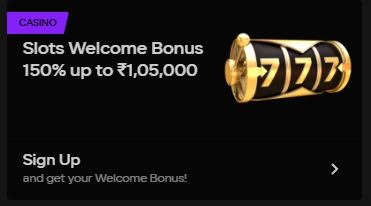
Step 4: Look for the Slots Welcome Bonus. Tap on it, then tap Activate Offer.
Step 5: You will be redirected to the Deposit page. Choose a payment method.
Step 6: Enter a deposit amount. It must be ₹100 or above.
Step 7: Wait for some time. Your bonus funds will be credited soon. Once done, play the eligible games and complete the wagering requirements.
Instant Games Deposit Bonus
If you activate the Parimatch Instant Games Welcome Bonus, you can get a 100% bonus on your first deposit. The minimum amount you need to deposit is ₹350. The maximum bonus you can receive is ₹30,000.
| Deposit Bonus Online Casino Instant Games: Terms & Requirements | |
| Who can get it? | Only new Parimatch users can claim this bonus. |
| When is it activated? | The bonus is added after your deposit is successfully transferred. |
| Minimum deposit | You must deposit at least ₹350. If you deposit less, you will not receive the bonus. |
| Bonus percentage | You get 100% extra on your deposit amount. |
| Maximum bonus | The highest bonus you can receive is ₹30,000. |
| Wagering requirement | You must play the bonus amount 50 times within 3 days before withdrawing. |
| Where to wager | Bonus wagering is allowed only in the “Instant Games” section. |
| Game contribution | Different Instant Games count differently towards wagering. You can check this on the “Games to Play” page. |
| Maximum withdrawal | You can withdraw up to 3 times the bonus amount. |
| Where to check eligible games | You can find them in the “Games for Wagering” section. |
| Withdrawal restriction | You cannot withdraw money until the bonus is fully cleared. |
| Winnings payout | Winnings will only be paid after you complete all wagering requirements. |
| Bonus auto-forfeit | If your bonus balance drops below ₹1, it will be automatically removed. |
| Bonus expiry | If the offer expires, the bonus and related winnings will be cancelled. |
| Multiple accounts rule | Only one account per person/household/IP can use this bonus. Multiple accounts may lead to cancellation. |
| Casino review rights | Parimatch can review transactions and cancel bonuses if unfair activity is detected. |
| Combining offers | This bonus cannot be combined with other promotions. |
| Offer changes | Parimatch can change or cancel this offer at any time. |
| Agreement | By accepting the bonus, you agree to all bonus rules and Terms & Conditions. |
| Real vs bonus money | When you play, real money is used first, then bonus money. |
| Refusing the bonus | If you have not placed any bets, you can cancel the bonus by contacting Support. |
How to Get the Bonus: Step by Step Guide
Step 1: Go to the Parimatch website or launch the Parimatch mobile app.
Step 2: Sign in to your account. It must be a newly created account with no previous deposits.
Step 3: Click on the three-line menu icon. Scroll down and select Promotions.

Step 4: Find the Instant Games Welcome Bonus, then tap it. Then press Activate Offer.

Step 5: You will be taken to the Deposit section. Select your preferred payment option.
Step 6: Enter your deposit amount. The minimum required amount is ₹300.
Step 7: After the payment is successful, your bonus will be added shortly. Start playing eligible games and complete the wagering conditions.
Live Casino Deposit Bonus
If you activate the Parimatch Live Casino Welcome Bonus, you can get a 100% bonus on your first deposit. The minimum amount you need to deposit is ₹100. The maximum bonus you can receive is ₹1,00,000.
| Deposit Bonus Online Casino Live Games: Terms & Requirements | |
| Who can get it? | Only new Parimatch users can claim this welcome bonus. |
| When is it activated? | The bonus is added after your first deposit is successful. |
| Minimum deposit | You must deposit at least ₹100. If you deposit less, you will not receive the bonus. |
| Bonus percentage | You get 100% extra on your first deposit. |
| Maximum bonus | The highest bonus you can receive is ₹1,00,000. |
| Wagering requirement | You must play the bonus amount 40 times within 3 days before you can withdraw. |
| Where to wager | Bonus wagering is allowed only in the “Live Casino” section. |
| Game contribution | Different Live Casino games count differently towards wagering. Details are available on the “Games to Play” page. |
| Maximum withdrawal | You can withdraw up to 2 times the bonus amount. |
| Where to check games | You can find eligible games in the “Games for Wagering” section. |
| Withdrawal restriction | You cannot withdraw money until you complete all bonus wagering requirements. |
| Winnings payout | Winnings will only be paid after the wagering is fully completed. |
| Bonus auto-removal | If your bonus balance becomes ₹5, it will be automatically removed. |
| Bonus expiry | If the offer expires, the bonus and related winnings will be cancelled. |
| Multiple accounts rule | Only one account per person/household/IP can use this bonus. Multiple accounts may lead to cancellation. |
| Casino review rights | Parimatch can review transactions and cancel bonuses if unfair strategies are found. |
| Combining offers | This bonus cannot be combined with other promotions. |
| Offer changes | Parimatch can change or cancel the offer at any time. |
| Agreement | By accepting the bonus, you agree to all bonus rules and Terms & Conditions. |
| Real vs bonus money | When playing, real money is used first, then bonus money. |
| Refusing the bonus | If you have not placed any bets, you can cancel the bonus by contacting support. |
How to Get the Bonus: Step by Step Guide
Step 1: Open the Parimatch app or visit the official Parimatch site.
Step 2: Log in to your new account. Make sure you haven’t made any deposits before.
Step 3: Tap the main menu (three horizontal lines). Scroll and choose the Promotions tab.

Step 4: Select the Live Casino Welcome Bonus from the list and tap Activate Offer.

Step 5: You will automatically move to the deposit page. Pick a payment method.
Step 6: Deposit ₹100 or more to qualify for the bonus.
Step 7: Once the deposit is confirmed, the bonus funds will appear in your account. Play the eligible slot games and finish the wagering requirements.
Sports Online Betting Deposit Bonus
If you activate the Parimatch Sports Welcome Bonus, you can get a 150% bonus on your first deposit. The minimum amount you need to deposit is ₹100. The maximum bonus you can receive is ₹20,000.
| Sports Online Betting Deposit Bonus: Terms & Requirements | |
| Who can get it? | New Parimatch users. |
| Minimum deposit | You must deposit at least ₹100. |
| Maximum bonus | Up to ₹20,000. |
| Bonus percentage | 150% on your deposit amount. |
| Deposit period | Deposit must be made within 1 day of accepting the offer. |
| Where to wager | Only on Sports betting (Pre-match & Live). |
| Wagering requirement | Bonus amount must be wagered 16 times (x16). |
| Wagering period | Within 3 days after bonus is credited. |
| Allowed bet types | Single bets or Parlay bets. |
| Minimum odds (Single) | 1.8 or higher. |
| Minimum odds (Parlay) | At least 1.4 per event. |
| Minimum events in Parlay | 3 events. |
| Minimum total Parlay odds | 2.2 total. |
| Excluded bets | CashOut bets, refunded bets (odds 1), canceled bets. |
| Excluded categories | BetGames, TVBET, Live Casino, Casino, Virtual Sports. |
| Maximum withdrawal | Up to 5x the bonus amount after successful wagering. |
| Bonus expiry | If wagering is not completed within 3 days, bonus is canceled. |
| Freebets contribution | Freebets do NOT count towards wagering. |
| Multiple accounts rule | One account per person/household/IP. Multiple accounts may lead to cancellation. |
| Combining offers | Cannot apply multiple bonus mechanics to the same bet. |
| Priority system | If you have more than one bonus active at the same time, they are used in a fixed order. First, your Freebet is used. If there is no Freebet, then Insurance applies. After that comes Cashback, and finally, the Deposit Bonus is used |
| Balance usage | Bonus funds are used first for qualifying bets. |
| Withdrawal restriction | Withdrawal is locked until wagering is fully completed. |
| Bonus cancellation | Can only cancel during the activation stage via Support. |
| Verification rights | Parimatch may verify accounts and suspend bonuses if suspicious activity is detected. |
How to Get the Bonus: Step-by-Step Guide
Step 1: Visit Parimatch online or open the Parimatch mobile application.
Step 2: Log in to your account. It should be a fresh account with zero previous deposits.
Step 3: Open the main navigation menu by tapping the three-line icon. Scroll down to find Promotions and select it.

Step 4: Locate the Sports Welcome Bonus offer. Tap it and choose Activate.

Step 5: You’ll be redirected to the payment page. Choose how you want to deposit.
Step 6: Enter at least ₹100 as your deposit amount.
Step 7: After the transaction is processed, the bonus will be credited. Use it to bet on sports and meet the wagering terms.
Trouble With Deposits? Contact Us!
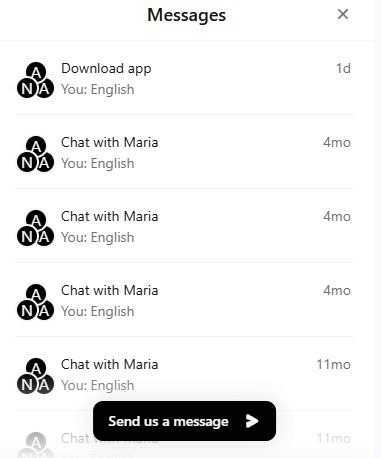
Depositing money into your Parimatch betting/gaming account is super simple. The steps are easy. We support Indian payment methods. There are no extra fees. You can add funds using your desktop, laptop, or phone. But what if you face any problem in the process? There is nothing to worry about. Parimatch support is there to assist you.
- Visit the Parimatch site or launch the app.
- Tap the three-line main menu icon.
- Scroll to the bottom and tap “Support.”
- Read the online FAQs. You may find your solution right there. If you can’t find the fix, tap “Online Chat.”
- Tap the Messages button. Then tap the option that says “Send Us Message.”
- Choose your language. Share your query. Our experts will get back to you with a solution.
Deposits on Parimatch: Possible Issues and Best Solutions
| Deposit not credited | Bank delay or UTR not submitted | Wait 5–10 minutes. If still not credited, submit UTR and contact Support. |
| Payment failed but money deducted | Temporary bank processing issue | Wait up to 24 hours. If not reversed, contact your bank and Support. |
| UPI transaction pending | Network or server delay | Do not retry immediately. Check your UPI app status and wait for confirmation. |
| Incorrect UTR entered | Typing mistake while submitting UTR | Recheck the UTR number and submit the correct 12-digit reference ID. |
| QR code not loading | Slow internet connection | Refresh the page or switch to a stable internet connection. |
| Deposit button not working | Browser/app glitch | Clear cache, restart the app, or try another browser/device. |
| Deposit limit exceeded | Amount higher than allowed maximum | Check minimum and maximum limits before depositing. |
| Bonus not credited | Offer not activated before deposit | Activate the bonus first, then make the deposit. |
| Account verification issue | KYC or account check pending | Complete verification and contact Support if needed. |
| Multiple failed attempts | Bank security restriction | Contact your bank and inform them about the transaction attempt. |
| Payment method not working | Temporary issue with the selected method | Try another available payment method like UPI, PhonePe, or Paytm. |